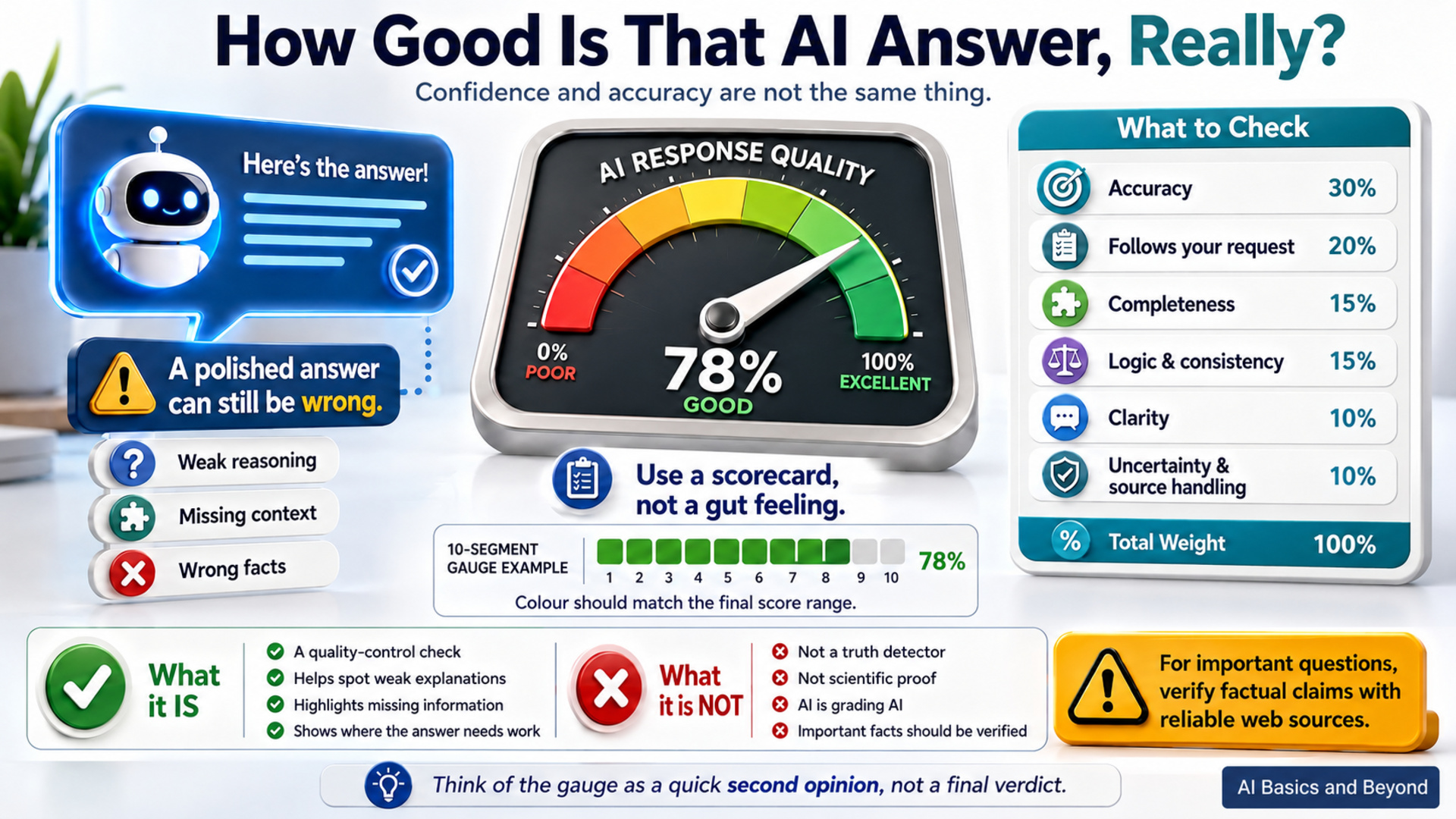
AI has a habit of sounding confident. Unfortunately, confidence and accuracy are not the same thing.
Overview
A response can be polished, detailed, and completely convincing while still containing weak reasoning, missing important context, or simply getting a fact wrong. That is why I don't recommend judging an AI answer by how professional it sounds.
One simple way to take a second look is to ask the AI to grade its own response against a defined set of standards.
Give AI a Scorecard
Instead of asking, “Is your answer correct?”—which will often get you another confident answer—give the AI specific criteria to evaluate.
The prompt below looks at factual reliability, whether your instructions were followed, completeness, reasoning, clarity, and how well uncertainty was handled. Each area is weighted, and the results are combined into a percentage score and colour gauge.
A lower score does not automatically mean the answer is wrong. A high score certainly does not prove it is right. What the gauge can do is draw your attention to weak explanations, missing information, poor reasoning, or instructions the AI may have overlooked.
Think of it as a quick quality-control check.
SAMPLE PROMPT
---
Evaluate the AI response immediately above.
Score its overall quality from 0% to 100% using the following weighted criteria:
- Factual accuracy and reliability — 30%
- Adherence to the user's request and instructions — 20%
- Completeness and usefulness — 15%
- Logic, reasoning, and internal consistency — 15%
- Clarity and readability — 10%
- Appropriate uncertainty, qualification, and source handling — 10%
Be critical. Do not inflate the score simply because the response sounds polished, detailed, or confident.
Where facts cannot be independently verified, treat factual accuracy as estimated and clearly state this limitation.
QUALITY GAUGE
DISPLAY THE RESULT AS FOLLOWS
90–100% — Excellent
75–89% — Good
60–74% — Needs Improvement
Below 60% — Poor
Create a 10-segment visual gauge.
GAUGE RULES
- Each segment represents approximately 10 percentage points.
- Round the overall score to the nearest 10 to determine the number of filled segments.
- Use the SAME colour for every filled segment.
- The colour of all filled segments must match the final score range:
90–100% — 🟩
75–89% — 🟨
60–74% — 🟧
Below 60% — 🟥
- Use ⬜ for all unfilled segments.
- The gauge must always contain exactly 10 segments.
- Do not mix green, yellow, orange, or red within the same gauge.
Examples
95%:
🟩🟩🟩🟩🟩🟩🟩🟩🟩🟩
85%:
🟨🟨🟨🟨🟨🟨🟨🟨🟨⬜
72%:
🟧🟧🟧🟧🟧🟧🟧⬜⬜⬜
54%:
🟥🟥🟥🟥🟥⬜⬜⬜⬜⬜
Then display:
OVERALL QUALITY: [score]%
STRONGEST AREA:
[One brief sentence]
WEAKEST AREA:
[One brief sentence]
MAIN CONCERN:
[The most important weakness, error, omission, or uncertainty]
HOW TO IMPROVE IT:
[One concise recommendation]
If factual accuracy was not independently verified, add:
FACTUAL ACCURACY:
Estimated only. Factual claims were not independently verified.
Do not rewrite the original response unless specifically asked.
---
How to Use It
After ChatGPT or another AI gives you an answer, paste the above prompt into the same conversation. It evaluates the response immediately above it and returns a percentage, colour gauge, and short critique.
Pay particular attention to the Main Concern and How to Improve It sections. In my view, these are often more useful than the percentage itself. The number is easy to glance at, but the criticism tells you where the answer may actually need work.
What Is It Really Measuring?
The gauge measures how well the response performs against the rubric you gave it. The percentage is a weighted evaluation score. It is not a scientific measurement, and it is not an independently verified accuracy rating.
For example, factual accuracy accounts for 30% of the score, while clarity accounts for 10%. The AI evaluates each area and combines those judgements into the final result.
Now for the important catch: AI is grading AI.
An AI can miss its own mistake. It may confidently give a false fact and then fail to recognize that error during the evaluation. That is especially worth remembering with recent news, obscure subjects, technical questions, and anything where accuracy really matters.
For important questions, add a requirement that factual claims be checked against reliable web sources before the score is assigned. That can improve the evidence checking, but even then, the percentage remains an AI-generated judgement.
Used properly, this is not a magic accuracy meter. It is a simple way to slow down, question a confident-looking answer, and make AI take a more critical look at its own work before you rely on it.